
Creating a slide deck used to mean spending hours aligning text boxes, adjusting bullet points, and searching for the right visuals. Today’s presentation apps can help you turn a rough outline into a polished deck faster, whether you’re pitching investors, leading a remote workshop, or teaching a class.
Alongside traditional slide editors, you’ll find tools that generate a first draft with AI, let you poll your audience live, or turn an explanation into an animated video. Collaborative whiteboards can also serve as presentation spaces where participants contribute as you go.
The platforms in this guide can help you choose a tool that suits how you work and how your audience will take part. You might need controls that keep every slide on brand, the ability to edit with teammates in real time, or ready to use templates. With less time spent on formatting, you can focus on making your message clear and delivering it with confidence.
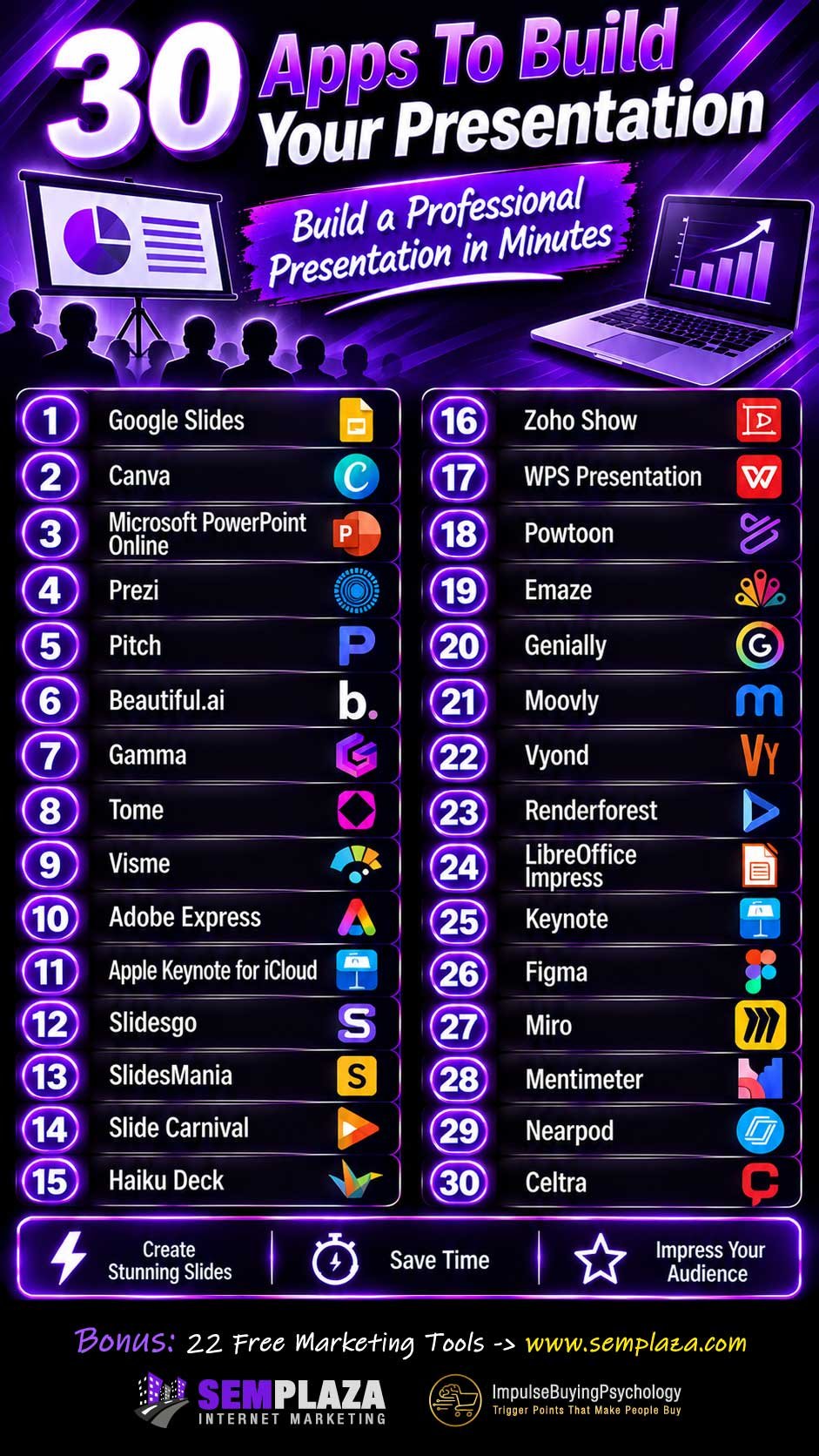
The Complete List of 30 Presentation Apps
Below, we have gathered 30 of the best presentation apps and slide resources covering cloud editors, AI-assisted deck builders, template libraries, and interactive visual tools.
Top Presentation Apps for Cloud Collaboration, AI, and Templates
- 1. Google Slides – A free, cloud-based presentation editor built into Google Workspace that excels at real-time team collaboration and seamless sharing.
- 2. Canva – A versatile visual design platform offering thousands of customizable presentation templates, drag-and-drop graphics, and brand kits.
- 3. Microsoft PowerPoint Online – The browser-based version of Microsoft’s industry-standard presentation software featuring cloud syncing and core slide design tools.
- 4. Prezi – A dynamic presentation platform known for its zooming, non-linear canvas that lets speakers pan across connected topics visually.
- 5. Pitch – A collaborative presentation software built for modern teams featuring smart formatting, live video embeds, and deck engagement analytics.
- 6. Beautiful.ai – An AI-driven presentation maker that automatically adapts slide layouts and proportions as you add text, charts, or images.
- 7. Gamma – An AI-powered workspace that turns rough notes or prompts into interactive, card-based presentations and web pages in seconds.
- 8. Tome – A storytelling-focused digital deck creator that popularized AI-generated slide layouts and narrative blocks before its presentation product was retired.
- 9. Visme – An all-in-one visual communication platform tailored for data-heavy presentations, interactive charts, and branded business decks.
- 10. Adobe Express – Adobe’s quick-action web and mobile design app offering professionally styled presentation templates and integrated Adobe Stock assets.
- 11. Apple Keynote for iCloud – The browser-accessible version of Apple’s presentation software allowing cross-platform editing and collaboration on Keynote decks.
- 12. Slidesgo – A massive template library providing thousands of free and premium customizable themes for Google Slides and PowerPoint.
- 13. SlidesMania – An independent template repository offering creative, free presentation and interactive planner templates for educators and professionals.
- 14. Slide Carnival – Also known as SlidesCarnival, a popular online catalog offering free, ready-to-use presentation templates compatible with PowerPoint, Google Slides, and Canva.
- 15. Haiku Deck – A streamlined presentation app that encourages clean, image-centric slides with minimal text and automatic photo attribution.

More Presentation Apps for Animation, Whiteboarding, and Engagement
- 16. Zoho Show – A collaborative online presentation tool within the Zoho Office Suite offering clean animations, compatibility with PowerPoint files, and broadcast features.
- 17. WPS Presentation – A lightweight, cross-platform slide editor included in WPS Office with strong Microsoft PowerPoint file compatibility and built-in templates.
- 18. Powtoon – A visual communication platform specializing in animated presentations and character-driven explainer videos for marketing and training.
- 19. Emaze – A web-based presentation builder offering 3D templates, panoramic slide transitions, and automated design layouts.
- 20. Genially – An interactive content creation platform used to build clickable presentations, gamified lessons, and animated infographics.
- 21. Moovly – A cloud-based multimedia editor that lets users combine stock video, motion graphics, and voiceovers into animated video presentations.
- 22. Vyond – An enterprise animation platform designed for creating custom character-based video presentations for corporate training and internal communications.
- 23. Renderforest – An online branding and video creation suite offering customizable templates for animated slideshows, pitch videos, and visual intros.
- 24. LibreOffice Impress – A free, open-source desktop presentation program featuring master pages, drawing tools, and broad multi-format export support.
- 25. Keynote – Apple’s native presentation application for Mac, iPad, and iPhone renowned for smooth cinematic transitions, typography, and Apple Pencil support.
- 26. Figma – A collaborative interface design tool widely used by product and brand teams to build custom slide systems and interactive presentation prototypes.
- 27. Miro – An infinite online collaborative whiteboard that includes a dedicated presentation mode for walking teams through visual frames and diagrams.
- 28. Mentimeter – An interactive presentation platform that embeds live polls, word clouds, and quizzes directly into slides to boost audience participation.
- 29. Nearpod – An instructional platform enabling teachers to build interactive slide lessons synced across student devices with real-time formative assessments.
- 30. Celtra – A cloud-based creative automation platform that helps enterprise marketing teams scale and adapt branded visual assets and presentations across channels.
Keeping a versatile mix of these presentation apps in your workflow ensures you never waste hours fighting stubborn formatting or starting from a blank white slide. Pair a fast layout generator like Gamma or Beautiful.ai with template libraries such as Slidesgo when you need a quick turnaround, or bring in interactive tools like Mentimeter and Miro when live audience participation matters most. Choosing the right platform for each project lets you spend less time nudging pixels and more time delivering a clear, memorable story.
Share this infographic on your site:

Gabi is the founder and CEO of Adurbs Networks, a digital marketing company he started in 2016 after years of building web projects.
Beginning as a web designer, he quickly expanded into full-spectrum digital marketing, working on email marketing, SEO, social media, PPC, and affiliate marketing.
Known for a practical, no-fluff approach, Gabi is an expert in PPC Advertising and Amazon Sponsored Ads, helping brands refine campaigns, boost ROI, and stay competitive. He’s also managed affiliate programs from both sides, giving him deep insight into performance marketing.