
AI image generation tools can help you create product mockups, illustrations, ad concepts, and graphics for your website from a written description. Some also accept a reference image, so you can give the model a visual example of the colors, composition, or style you want. If you sell products online, you might start with an existing product photo and generate a new setting for it.
If you run ads, you can use the same brief to explore several visual directions before choosing one to refine.
The right tool depends on what you need to deliver. A poster with a headline calls for a generator that handles lettering or lets you edit the text separately. A logo or icon may need an editable vector, while a product image may need a tool that can change the background without altering the item itself.
Before you publish, review the output at its final size and check the plan’s generation limits and terms for commercial use.
The Complete List of 30 AI Image Generation Tools
The list includes browser tools, image editing platforms, models you can run locally, and APIs you can build into your own workflow. Each entry highlights a feature or use case to help you decide what to try first.
Top AI Image Generators
- 1. Midjourney – Generate images from text and use reference images to guide the content, composition, or colors.
- 2. DALL-E (OpenAI) – OpenAI’s earlier image generation model family includes DALL-E 2 and DALL-E 3, both removed from the OpenAI API in May 2026.
- 3. Google Gemini (Imagen) – Google offers Imagen through the Gemini API, while the Gemini app uses its Nano Banana models for image generation and editing.
- 4. Adobe Firefly – Generate images from text prompts and adjust settings such as aspect ratio and visual style.
- 5. Stable Diffusion (Stability AI) – Create images from text with models such as Stable Diffusion 3.5, which you can run locally on compatible hardware.
- 6. Ideogram – Generate visuals that include lettering, such as a poster with a headline or a graphic with a short slogan.
- 7. Leonardo.Ai – Choose from several image models to generate or revise illustrations, concept art, and other visuals.
- 8. Recraft – Generate editable vector graphics from text prompts and refine their shapes and colors in the vector editor.
- 9. Krea AI – Generate and edit images with Krea’s own image models in the same workspace.
- 10. NightCafe – Create images from text prompts using a selection of models available through its web studio.
- 11. Craiyon – Turn a written description into images such as illustrations, poster concepts, or coloring pages.
- 12. Freepik AI – The image generator now branded Magnific turns text prompts into images and lets you choose from multiple models.
- 13. Canva Magic Media – Generate photos or graphics from text prompts and add them directly to a Canva design.
- 14. Picsart AI – Create images from text using models suited to different outputs, including illustrations and photorealistic scenes.
- 15. Meta AI (Imagine) – Generate images from written prompts in Meta AI, where Meta makes its Muse Image model available.

More AI Image Tools to Try
- 16. Microsoft Designer – Generate images from written descriptions and use them in graphics you assemble in Designer.
- 17. Flux (Black Forest Labs) – The FLUX family includes models that generate images from text and edit existing images using visual references.
- 18. Luma Dream Machine – Create still images with Luma’s Photon models and use them as starting points for video projects.
- 19. Playground AI – Customize design templates and use AI editing to adapt them for graphics such as posters or social posts.
- 20. SeaArt AI – Generate images from text using models shared by the SeaArt community or published by SeaArt itself.
- 21. Artbreeder – Combine images and text in Composer or blend and adjust existing images in Splicer.
- 22. DeepAI – Generate an image from text in your browser or send the prompt through DeepAI’s API.
- 23. StarryAI – Create digital artwork and illustrations from written prompts.
- 24. Runway ML – Generate still images with Gen-4 Image and use reference images to guide elements such as characters or settings.
- 25. Clipdrop – Turn a text prompt into an image through Clipdrop’s browser tool or API.
- 26. Photoroom – Generate a new background for an existing product photo using the image and a written prompt.
- 27. Fotor – Create images from text prompts in Fotor’s online image generator.
- 28. Vecteezy AI – Describe a scene or shot to generate a photorealistic image in Vecteezy AI Studio.
- 29. Prodia – Add image generation to an app or workflow through an API that accepts text prompts or existing images.
- 30. GetIMG.ai – Generate images from text and use reference images with models that support them.
Pick two tools that can produce the file you need and give them the same brief. For a product photo, check whether the packaging and label stay accurate. For an ad, check the lettering at the size people will see it. Choose the tool that gives you a usable result with the fewest edits.
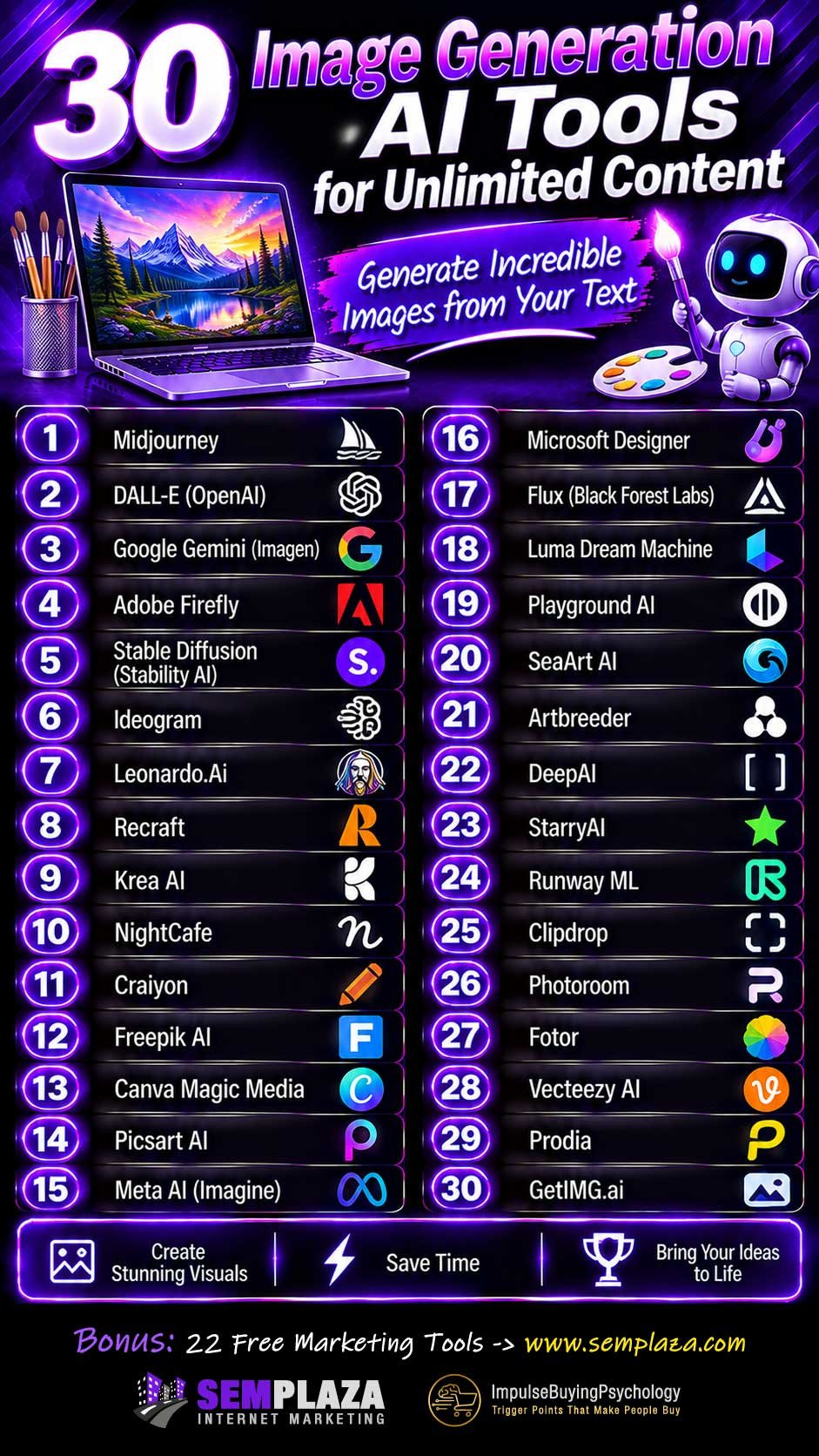
Share this infographic on your site:

Gabi is the founder and CEO of Adurbs Networks, a digital marketing company he started in 2016 after years of building web projects.
Beginning as a web designer, he quickly expanded into full-spectrum digital marketing, working on email marketing, SEO, social media, PPC, and affiliate marketing.
Known for a practical, no-fluff approach, Gabi is an expert in PPC Advertising and Amazon Sponsored Ads, helping brands refine campaigns, boost ROI, and stay competitive. He’s also managed affiliate programs from both sides, giving him deep insight into performance marketing.