
Creating high-converting video content used to require expensive gear and hours of editing. Today, generative AI lets you turn simple text prompts or static images into polished videos in minutes. Below, we’ve rounded up 30 of the top AI video generators, from cinematic text-to-video models to realistic AI avatars, plus a quick breakdown of how to pick the right one.
The Complete List of 30 AI Video Generation Tools
This list covers tools that generate individual shots, platforms that assemble complete videos, and editors that let you refine the result. Generation limits vary by plan, and the list identifies retired models and services where relevant.
Top AI Video Generators
- 1. Runway (Gen-2 / Gen-3) – Industry-leading generative video suite known for realistic motion and granular camera controls.
- 2. Luma Dream Machine – Fast, high-quality AI model that generates smooth, physics-accurate video clips from text and images.
- 3. Pika – Creator-friendly video generator featuring lip-syncing, sound effects, and easy region editing.
- 4. Kling AI – High-definition text-to-video platform capable of generating longer, lifelike motion sequences.
- 5. Hailuo AI (MiniMax) – Powerful video synthesis model praised for expressive character movements and dynamic camera angles.
- 6. Sora (OpenAI) – OpenAI’s flagship video model built to create complex, multi-character scenes from detailed text prompts.
- 7. Google Veo – It can generate video with sound, including dialogue and environmental effects, in Veo 3.1.
- 8. Grok Imagine (xAI) – It can animate a still image and generate dialogue, sound effects, and ambient audio alongside the visuals.
- 9. Adobe Firefly Video – Creates clips from text prompts and lets you use images as keyframes to guide the result.
- 10. Kaiber – Combines AI video generation with a Beat Sync workspace that matches visuals to music.
- 11. PixVerse – Animates an uploaded image into a video clip, with a text prompt to describe the motion you want.
- 12. Vidu – Generates clips from prompts, images, or visual references that guide the appearance of subjects in the scene.
- 13. InVideo AI – Turns a prompt into a video draft with scenes, visuals, narration, and music.
- 14. Stable Video Diffusion (Stability AI) – It is a research model that animates a still image into a short clip and can run locally with the published model weights.
- 15. Synthesia – Creates videos in which an AI presenter delivers your script, a format suited to training and instructional content.
More AI Video Tools to Try
- 16. HeyGen – Turns a script into a video delivered by an AI avatar, such as a presenter for a product explainer.
- 17. DeepBrain AI – Lets you choose an avatar and voice in AI Studios, then use a template and your script to create a presenter video.
- 18. Colossyan – Lets you use AI avatars, including cartoon presenters, in workplace training videos.
- 19. Elai.io – Turns a written script into narration delivered by an avatar across slides in a video presentation.
- 20. Deforum – Uses Stable Diffusion to create animated sequences with options for 2D and 3D motion.
- 21. Veed.io – Turns an idea or script into a video draft with footage, narration, and automatic subtitles.
- 22. Kapwing AI – Generates video from a script, article, or prompt and lets you edit the result in the same workspace.
- 23. Morph Studio – Lets you generate clips from text or images and arrange shots on a storyboard.
- 24. Vyond AI – It uses Vyond Go to generate a video and script from a prompt.
- 25. Canva Magic Media (Video) – turns a text prompt into a short, silent clip you can add to a Canva design.
- 26. Picsart AI Video – generates clips from text or images and lets you trim and arrange them in its video editor.
- 27. Fotor AI Video – Lets you generate clips from text prompts or animate still images using models available in its editor.
- 28. Vrew – Can build a video from a few keywords, including the script, visuals, and audio.
- 29. Steve.AI – Converts written text into animated videos, a format you can use for short explainers.
- 30. Visla – Creates an editable video from a script using stock footage or AI generated visuals.
Use this list to shortlist tools by the kind of video you need. Try an image animator for a product shot, an avatar platform for a training video, or a script based editor for a narrated social post. Test the same brief in two tools and compare the finished clips, the edits each one needs, and how much you can generate on your plan.
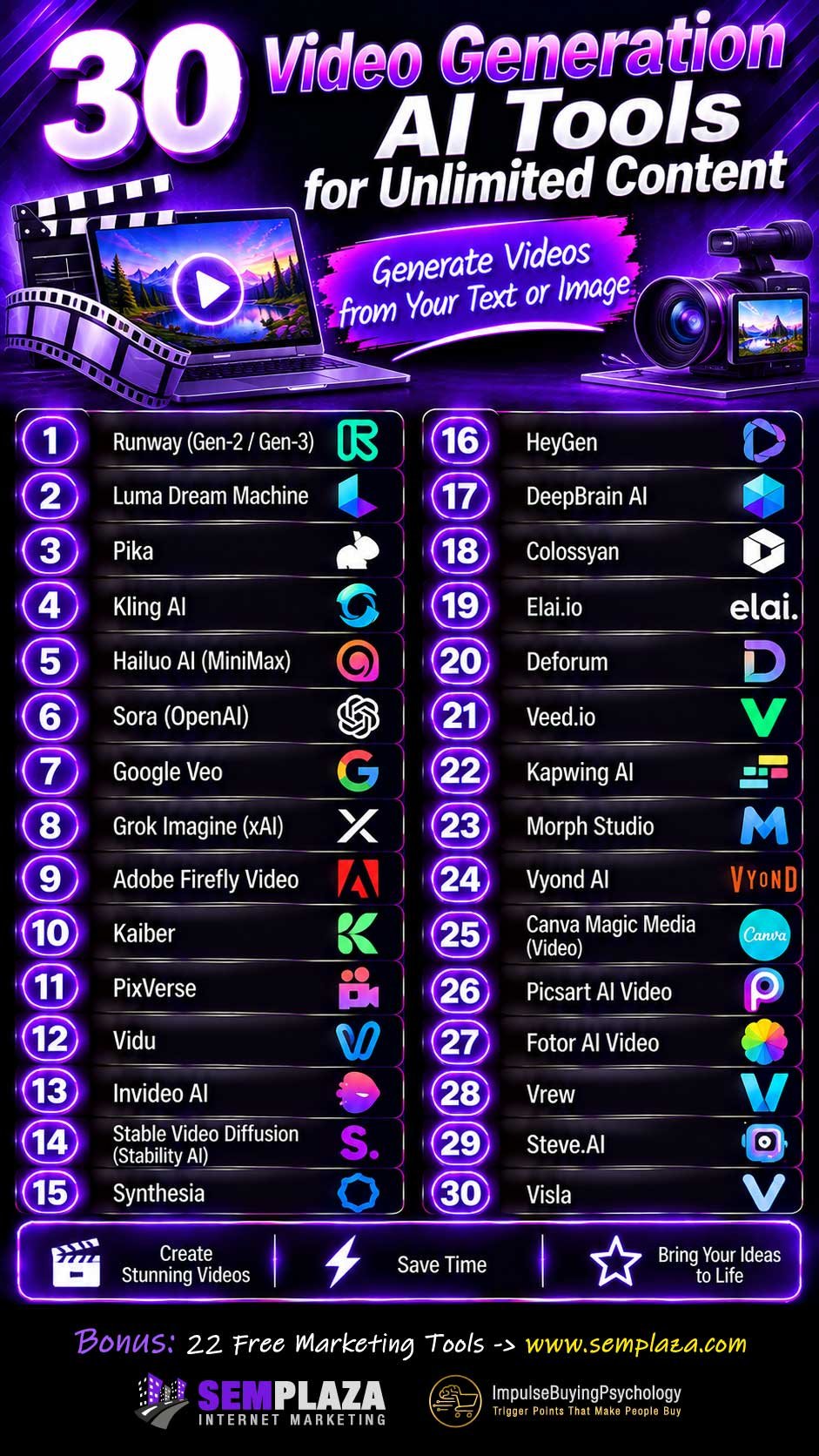
Share this infographic on your site:

Gabi is the founder and CEO of Adurbs Networks, a digital marketing company he started in 2016 after years of building web projects.
Beginning as a web designer, he quickly expanded into full-spectrum digital marketing, working on email marketing, SEO, social media, PPC, and affiliate marketing.
Known for a practical, no-fluff approach, Gabi is an expert in PPC Advertising and Amazon Sponsored Ads, helping brands refine campaigns, boost ROI, and stay competitive. He’s also managed affiliate programs from both sides, giving him deep insight into performance marketing.