
Building and scaling a successful YouTube channel takes far more than simply hitting record and uploading a raw video file.
YouTube resources span keyword research platforms, thumbnail designers, AI-assisted video editors, multi-platform streaming software, and royalty-free music libraries that streamline every stage of production.
Whether you are a solo creator filming tutorials from a home desk, a podcaster repurposing long-form episodes into YouTube Shorts, or a media team managing live broadcasts, the right software stack saves hours of repetitive work
Modern creator tools help you validate search demand before filming, trim awkward pauses automatically, design click-worthy thumbnails, and track real-time channel analytics.
Because every channel has different needs across pre-production, editing, audio licensing, and SEO optimization, assembling the right toolkit makes a measurable difference.
Next, you will find a list of the leading apps and websites supporting YouTube creators today.
The Complete List of 30 YouTube Resources
We have organized 30 notable YouTube resources below, spanning channel analytics and SEO suites, video editing software, live streaming studios, thumbnail creators, and royalty-free audio libraries, so you can easily find the best fit for your workflow.
Top YouTube Content Creation Resources
- 1. YouTube Studio – Official creator dashboard from YouTube for uploading videos, tracking real-time channel analytics, managing monetization, and running thumbnail A/B tests.
- 2. TubeBuddy – Browser extension and creator toolkit offering keyword research, bulk metadata editing, SEO checklists, and A/B testing directly inside YouTube.
- 3. vidIQ – YouTube growth and SEO platform providing keyword volume scores, competitor tracking, daily video ideas, and channel audit tools.
- 4. Canva – Accessible browser-based graphic design platform packed with customizable YouTube thumbnail, channel banner, and end-screen templates.
- 5. Populs – Online question-and-answer platform where creators and users ask questions, crowdsource answers, and explore audience topics across categories.
- 6. Social Blade – Public social media analytics website tracking subscriber growth, view counts, estimated earnings, and rankings for YouTube channels.
- 7. Morningfame – Invitation-only YouTube analytics and keyword research tool designed to translate complex channel metrics into step-by-step growth recommendations.
- 8. TubeRanker – Web-based YouTube SEO suite offering channel audits, tag generators, keyword research, title optimization, and video rank tracking.
- 9. Tubefilter – Leading digital entertainment and creator economy publication covering YouTube news, algorithm updates, industry trends, and creator business insights.
- 10. Restream – Cloud-based live streaming studio that lets creators broadcast simultaneously to YouTube, Twitch, LinkedIn, and other platforms with unified chat.
- 11. OBS Studio – Free, open-source software for high-performance screen recording and live video broadcasting with customizable scenes and audio mixing.
- 12. Streamlabs – Live streaming software suite built for creators to manage YouTube broadcasts, custom overlays, viewer alerts, and multistreaming workflows.
- 13. Descript – Collaborative audio and video editor that lets creators edit video footage simply by deleting words in an automatically generated text transcript.
- 14. Opus Clip – AI video repurposing tool that analyzes long-form YouTube videos to extract high-retention vertical clips with animated captions for Shorts.
- 15. Munch – AI video editing platform that identifies engaging moments in long recordings and reformats them into social-ready clips with automated captions.

More YouTube Resources to Try
- 16. Kapwing – Browser-based collaborative video editor featuring auto-subtitles, smart cut tools, resizing presets, and brand templates for fast YouTube production.
- 17. DaVinci Resolve – Professional video editing software combining non-linear editing, industry-standard color grading, visual effects, and audio post-production in one suite.
- 18. Adobe Premiere Pro – Industry-standard timeline video editor equipped with text-based editing, audio cleanup, and seamless Creative Cloud integration for YouTube filmmakers.
- 19. Final Cut Pro – Apple’s high-speed professional video editing software optimized for Mac hardware with magnetic timeline tools and motion graphics support.
- 20. Epidemic Sound – Royalty-free music and sound effects subscription library engineered to protect YouTube creators from copyright claims across monetized channels.
- 21. Artlist – Creative licensing platform offering unlimited access to curated royalty-free music, sound effects, stock footage, and video templates for creators.
- 22. Envato Elements – All-in-one creative asset subscription providing stock video, Premiere and Final Cut templates, graphics, music tracks, and sound effects.
- 23. Fotor – Web-based photo editor and graphic design tool featuring AI background removal, image enhancement, and ready-made YouTube thumbnail templates.
- 24. Snappa – Fast online graphic design tool tailored for marketers and creators to build custom YouTube thumbnails and channel art in minutes.
- 25. Thumbnail Blaster – Web-based thumbnail creation software offering niche-specific templates and layout tools designed to improve YouTube click-through rates.
- 26. Gling – AI-powered desktop video editor built specifically for YouTube talking-head creators to automatically cut silences, filler words, and bad takes.
- 27. Audiio – Music and sound effects licensing platform providing curated tracks and stems cleared for YouTube monetization and commercial video projects.
- 28. VidiQ AI Coach – Conversational AI assistant inside vidIQ that analyzes your specific channel data to brainstorm video concepts, titles, and growth strategies.
- 29. StreamYard – Browser-based live streaming and podcast recording studio that makes it easy to host remote guests and stream directly to YouTube.
- 30. Google Trends – Free search intelligence tool from Google that reveals rising search topics and YouTube-specific search interest to help creators spot timely video ideas.
Using this list as a starting point, you can build a reliable production stack tailored to your channel’s format, whether you are scripting data-backed tutorials, editing talking-head episodes in half the time, or running multi-camera live streams. Because each app and website solves a specific bottleneck across ideation, editing, design, and analytics, combining a few complementary tools will help you publish consistently and grow your audience faster.
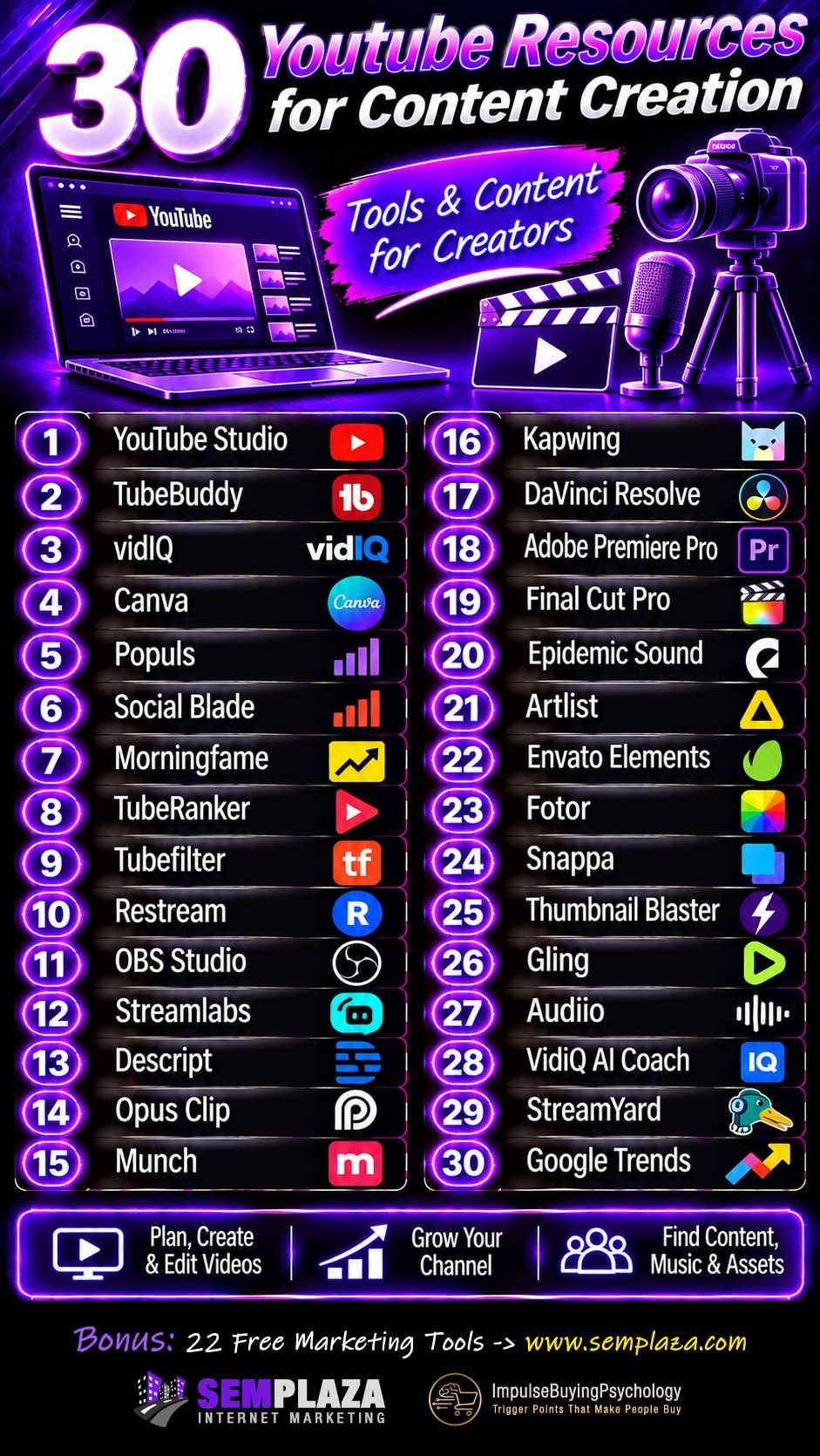
Share this infographic on your site:

Gabi is the founder and CEO of Adurbs Networks, a digital marketing company he started in 2016 after years of building web projects.
Beginning as a web designer, he quickly expanded into full-spectrum digital marketing, working on email marketing, SEO, social media, PPC, and affiliate marketing.
Known for a practical, no-fluff approach, Gabi is an expert in PPC Advertising and Amazon Sponsored Ads, helping brands refine campaigns, boost ROI, and stay competitive. He’s also managed affiliate programs from both sides, giving him deep insight into performance marketing.