
AI audio generation tools can turn a script into a voiceover, create background music from a description, or produce a sound effect for a specific moment in a video.
The tool you choose depends on where the audio will be used. For a product demo, you might need clear narration that fits the timing of each scene. For a social ad, you could try several music styles under the same edit to hear which one supports the message without covering the voice. A podcast editor might generate a short intro, then use a separate tool to isolate speech in an existing recording.
When writing a music prompt, describe the mood, tempo, instruments, and whether you want vocals. For narration, listen for mispronounced names, awkward pauses, and changes in volume.
Before publishing, check the terms for your intended use, especially if the audio will run in paid ads or monetized videos. If you expect to generate audio regularly, compare each plan’s credits, duration limits, and export options.
The Complete List of 30 AI Audio Generation Tools
The list includes music generators, voice tools, video editors, and resources for finding or isolating existing sounds. It also identifies research projects, retired services, and entries that need clarification.
Top AI Audio Generators
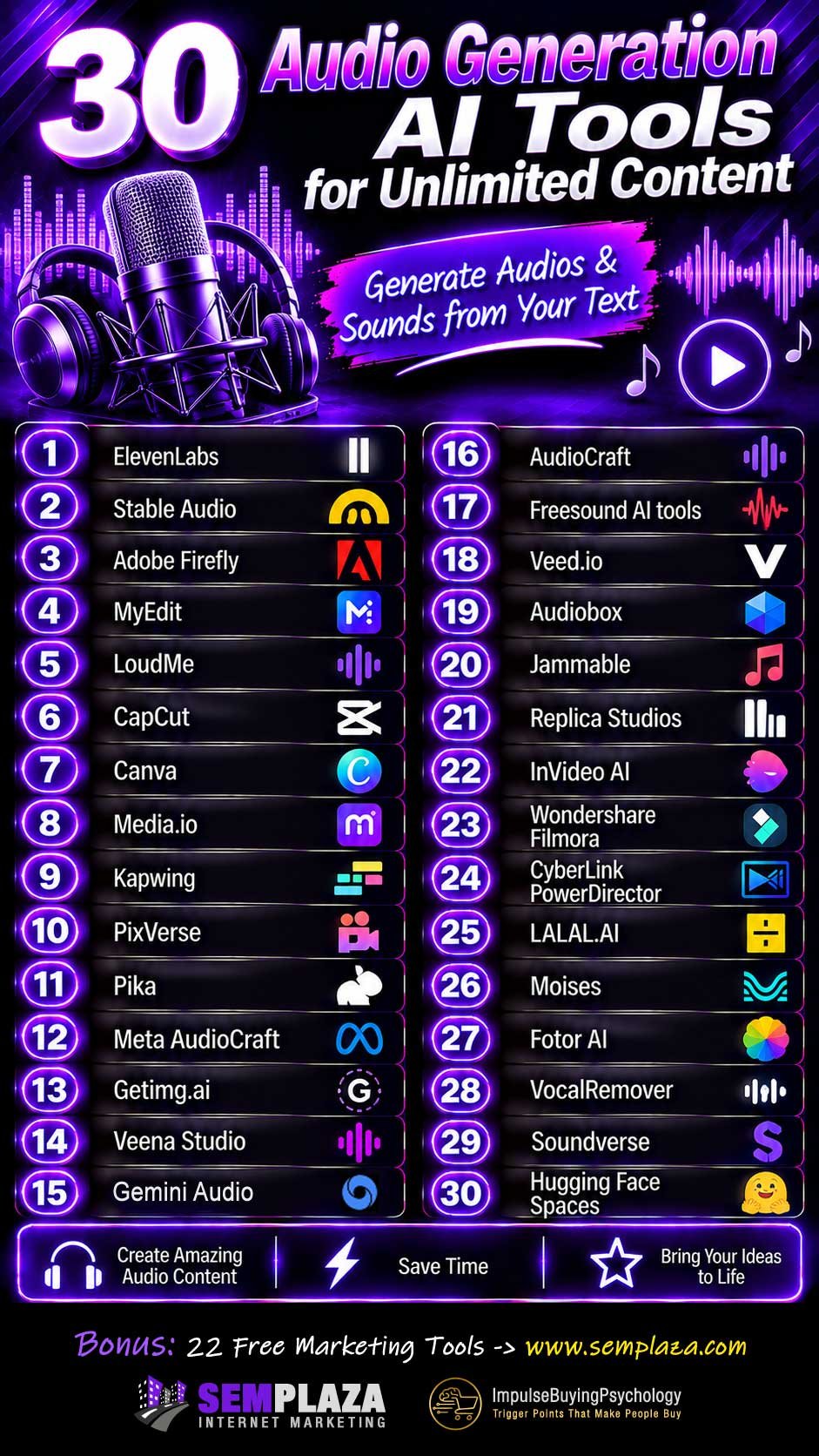
- 1. ElevenLabs – Generate spoken narration from a script or create sound effects from written descriptions.
- 2. Stable Audio – Describe the music or sound effect you want and generate an audio track from the prompt.
- 3. Adobe Firefly – Generate sound effects from text prompts for videos, social posts, and other projects.
- 4. MyEdit – Convert written text into speech or use its audio editor to remove background noise from an existing recording.
- 5. LoudMe – Generate songs or describe a specific sound effect you want to create.
- 6. CapCut – Turn written text into a voiceover and add it to a video in the same editor.
- 7. Canva – Generate music, sound effects, or voiceovers for use in a Canva design.
- 8. Media.io – Create a soundtrack from a written prompt or turn your lyrics into a song with vocals.
- 9. Kapwing – Describe a sound effect in text, then add the generated audio to a video project.
- 10. PixVerse – Generate sound effects for video using its audio generation feature.
- 11. Pika – Use Pika Audio to generate sound effects from text prompts for videos, games, or other projects.
- 12. Meta AudioCraft – Meta’s research toolkit includes MusicGen for generating music and AudioGen for producing sounds from text.
- 13. Getimg.ai – Generate sound effects from written descriptions using the audio tools in its browser workspace.
- 14. Veena Studio – Generate music from a prompt and develop it in Veena’s browser based studio.
- 15. Gemini Audio – It offers natural and powerful audio models that developers can use to generate natural vocals at speed.

More AI Audio Tools and Resources
- 16. AudioCraft – This is the same Meta toolkit listed at number 12, and its published code includes examples for running MusicGen.
- 17. Freesound AI tools – Freesound is a library of uploaded audio clips that lets contributors label sounds created with generative AI.
- 18. Veed.io – Turn a written script into a synthetic voiceover and add it to a video in the editor.
- 19. Audiobox – Meta developed this research model to generate voices and sound effects before retiring its public demo in February 2026.
- 20. Jammable – Create a cover by applying a selected AI voice to an audio recording.
- 21. Replica Studios – The company offered AI voice tools for creative projects before it ceased operations in 2025.
- 22. InVideo AI – Generate spoken narration as part of a video draft built from a prompt or script.
- 23. Wondershare Filmora – Convert text into a voiceover using preset voices in the video editor.
- 24. CyberLink PowerDirector – Generate music for a video project with the AI Music Generator in PowerDirector 365.
- 25. LALAL.AI – Separate vocals or individual instrument tracks from an existing recording.
- 26. Moises – Split an uploaded song into separate tracks so you can isolate or mute vocals and instruments.
- 27. Fotor AI – Use its song generator to turn written lyrics into a track.
- 28. VocalRemover – Split an uploaded song into a vocal track and an instrumental track.
- 29. Soundverse – Turn a text prompt into a song or an instrumental track using its music generation tools.
- 30. Hugging Face Spaces – Browse community demos or try an audio generation model such as MusicGen in your browser.
Use this list to shortlist tools by the audio you need. For a voiceover, give two tools the same script and compare pronunciation, pacing, and how well the narration fits your edit. For music or sound effects, try the same prompt and judge each clip alongside the dialogue and visuals it needs to support.
Share this infographic on your site:

Gabi is the founder and CEO of Adurbs Networks, a digital marketing company he started in 2016 after years of building web projects.
Beginning as a web designer, he quickly expanded into full-spectrum digital marketing, working on email marketing, SEO, social media, PPC, and affiliate marketing.
Known for a practical, no-fluff approach, Gabi is an expert in PPC Advertising and Amazon Sponsored Ads, helping brands refine campaigns, boost ROI, and stay competitive. He’s also managed affiliate programs from both sides, giving him deep insight into performance marketing.